1 min read
Try it in your own Jira.
All VIP.LEAN apps run on Forge and come with a free trial on the Atlassian Marketplace.
All VIP.LEAN apps run on Forge and come with a free trial on the Atlassian Marketplace.
A practical walkthrough of floating license management for Jira Data Center — with real pricing data, a step-by-step case study for 15,000 users, and the math behind saving $373,000 per year.

(TU-Munich, 1997). 29 years of experience as a project, program and portfolio manager. Certified as a SAFE Agilist, Project Manager (GPM) and Scrum Master.

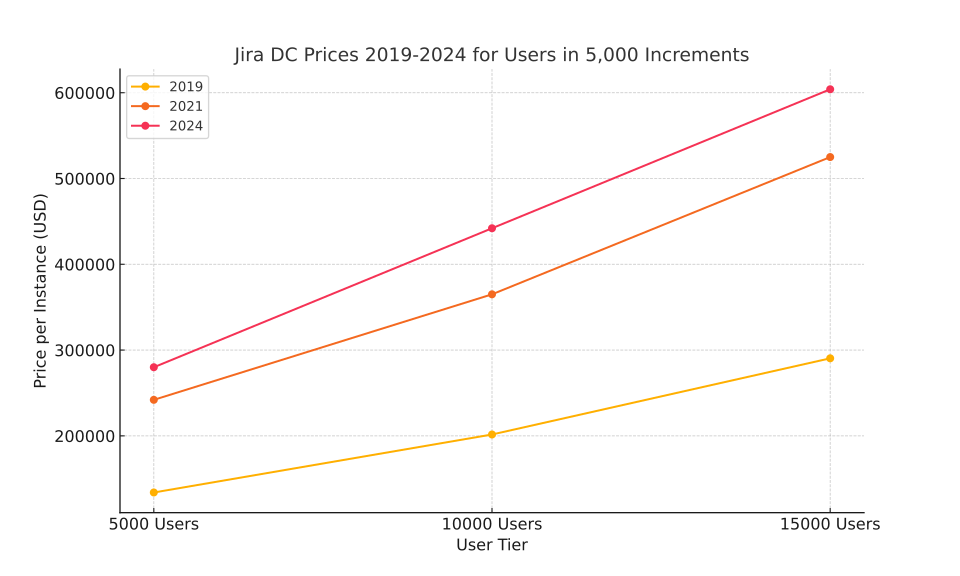
If you’ve been renewing Jira Data Center licenses over the past few years, you already know the trend. For a 15,000-user tier, the numbers look like this:
That’s more than double in five years. Atlassian has invested heavily in the platform, but the bill has to land somewhere — and it lands on your renewal. (List prices change over time; always confirm your tier in Atlassian’s current Data Center pricing.)
The sticker price is only part of the story. Most Jira DC costs sit in OPEX, which means they can’t be capitalized — they hit the P&L directly, every year. And it’s not just the Jira license itself. Third-party app pricing usually scales with your user count too. So when Atlassian raises the tier price, your Tempo bill goes up, your ScriptRunner bill goes up, and suddenly the total cost of ownership is 30–40% higher than the license alone.
We’ve seen this catch finance teams off guard more than once. The Jira renewal comes in, gets approved because “it’s the same as last year plus inflation” — and then three months later someone notices the app marketplace invoices jumped too.
There’s no single fix, but a few things tend to make the biggest difference:
Clean up your user base regularly. Most Jira instances have hundreds of accounts that haven’t logged in for months — sometimes years. These still count toward your license tier. A quarterly cleanup sounds boring, but it can drop you an entire pricing tier if the numbers are close.
Figure out who actually needs a full license. Not every user in your directory is a daily Jira user. Some log in once a quarter for a status update. Others left the company but their account is still active. Separating heavy users from occasional users is the foundation for everything else.
Allocate costs to the teams that use them. Once departments see what their share of the Jira bill actually is, behavior changes. We’ve seen teams voluntarily clean up their own inactive accounts when the cost center allocation made it visible.
And then there’s the big one: floating licenses. Instead of paying for every user in your directory, you optimize how many licensed users you actually need by dynamically assigning and releasing seats based on activity. That’s what the rest of this article is about.
Before jumping into floating licenses, it helps to understand who’s actually in your Jira instance. In a typical 15,000-user setup, we see roughly five groups:
Admins manage the instance — they need permanent licenses, no question. But they’re usually fewer than 50 people.
Heavy users live in Jira all day. Developers, project managers, scrum masters. They create issues, update boards, run queries. Permanent licenses make sense here too.
Management / VIP users check dashboards, review reports, approve things. They log in a few times a week, sometimes less. Full licenses for this group are expensive relative to their usage.
Standard users interact with Jira regularly but don’t depend on it minute-by-minute. They update their tickets, check sprint boards, maybe log time.
Occasional users and inactive accounts — the silent majority in many instances. People who log in once a month, or accounts that haven’t been touched since someone changed departments two years ago. These accounts still cost the same as your busiest developer.
Groups three through five are where the money is. They represent the bulk of your user count but a fraction of the actual concurrent usage. That’s exactly the gap floating licenses are designed to close.
You’ll need the VIP.LEAN Floating Licenses app installed on your Jira Data Center instance.

We offer a free 3-month trial license so you can find your optimal setup before committing. That trial period is important — rushing this leads to either over-provisioning (wasting money) or under-provisioning (locking people out).
Start by identifying which users should be managed by floating licenses. In a 15,000-user instance, you’ll typically exclude admins, technical/API users, and your heaviest users from the floating pool. In our example, that leaves about 14,500 users who get managed dynamically.
Create two Jira groups:
Install the trial license for 15,000 floating licenses. Move those 14,500 users into “jira-virtual-users.” From now on, when any of them logs in, the app automatically assigns a license and adds them to “jira-software-users.” When they’ve been inactive for a set period — we usually start with 60 minutes — their license gets released back to the pool.
The first few days, nothing visible changes. Everyone can still log in. The app is just tracking usage patterns in the background.
Here’s where it gets interesting. Start reducing the available floating licenses from 14,500 — we usually drop by 200–500 per week, depending on usage patterns. Monitor whether anyone gets locked out or complains.
In our experience, many organizations land somewhere around 3,500 concurrent licenses to serve 14,500 floating users comfortably. That’s roughly a 4:1 ratio, which is consistent across most enterprise deployments we’ve seen.
If users start getting rejected at login:
The goal isn’t to squeeze every last license — it’s to find the point where nobody notices the system is even in place.
Let’s say you settle on 4,000 concurrent licenses to cover your 15,000 users. You purchase the VIP.LEAN Floating Licenses app for 15,000 floating users and keep a 3-month observation window to confirm the numbers hold.
After that, you reduce your Jira Data Center subscription from 15,000 to the licensing tier that covers your concurrent need. The math:
USD 604,000 (15,000 users) → USD 231,000 (reduced tier) = USD 373,000 saved per year
That’s not a theoretical number. It’s what happens when you stop paying for 11,000 users who aren’t logged in.
Floating licenses work best when you have a large gap between total users and peak concurrent usage — which is the case in most enterprise Jira instances. If your 15,000 users are all developers working in Jira eight hours a day, the ratio won’t be 4:1. But that’s rarely the reality.
The 3-month trial exists precisely for this reason: measure first, commit later. The data will tell you whether the savings are there.
.svg)