1 min read
Try it in your own Jira.
All VIP.LEAN apps run on Forge and come with a free trial on the Atlassian Marketplace.
All VIP.LEAN apps run on Forge and come with a free trial on the Atlassian Marketplace.
Many enterprises use Jira for delivery governance and SAP S/4HANA for financial controlling. This article describes a workflow-driven integration model that aligns Jira approval processes with SAP WBS structures through structured hierarchy design, controlled ETL synchronisation, and financial validation guardrails. Based on a large-scale enterprise implementation, it demonstrates how to achieve stable year-end financial alignment and transparent cost reporting.

2013: Doctor of Computer Science. 2021: Master of Business Administration (MBA). 13 years of experience in project management.

Many enterprises use Jira Software as the governance layer for demand intake, prioritisation, estimation, and delivery tracking, while SAP S/4HANA serves as the financial backbone for budgets, WBS structures, procurement, and accounting truth.
In an enterprise client engagement with several thousand end users, we encountered a scenario where Jira was already deeply embedded in technology and delivery processes, while a new SAP S/4HANA landscape required structured synchronisation. The challenge was not tool capability, but the need to conceptually and technically align established governance workflows with financial controlling structures.
This article outlines how we designed and implemented that synchronisation in a scalable and enterprise-ready way.
Jira is built for governance of delivery: capturing demand, running approvals, estimating effort, prioritising the backlog, and controlling change. SAP S/4HANA is built for financial enforcement: WBS structures, budget availability checks, procurement constraints (POs), actual postings, and open commitments.
A scalable integration respects this boundary: Jira expresses decisions; SAP enforces what is financially real. Synchronisation is therefore not “data copying”, but controlled lifecycle alignment.
In enterprise environments, this boundary must be explicit. Without a clear separation of governance responsibilities and financial enforcement, integration designs tend to create operational friction rather than stability.
The following sections outline practical principles and implementation patterns for designing an effective Jira–SAP integration model — from aligning business processes to ensuring clean data flows and long-term scalability.
In one of our enterprise client engagements, we structured the Jira landscape along a governance model driven by financial accountability and SAP controlling requirements rather than by a generic portfolio hierarchy.
The structure was defined as follows:
This structure ensured that financial ownership (who funds), delivery accountability (who executes), and project-level controlling (where costs are accumulated) remained clearly separated yet fully traceable across Jira and SAP.
Rather than defining a universal framework, the model emerged from the need to align an already established Jira governance landscape with SAP S/4HANA controlling requirements in a scalable and maintainable way.
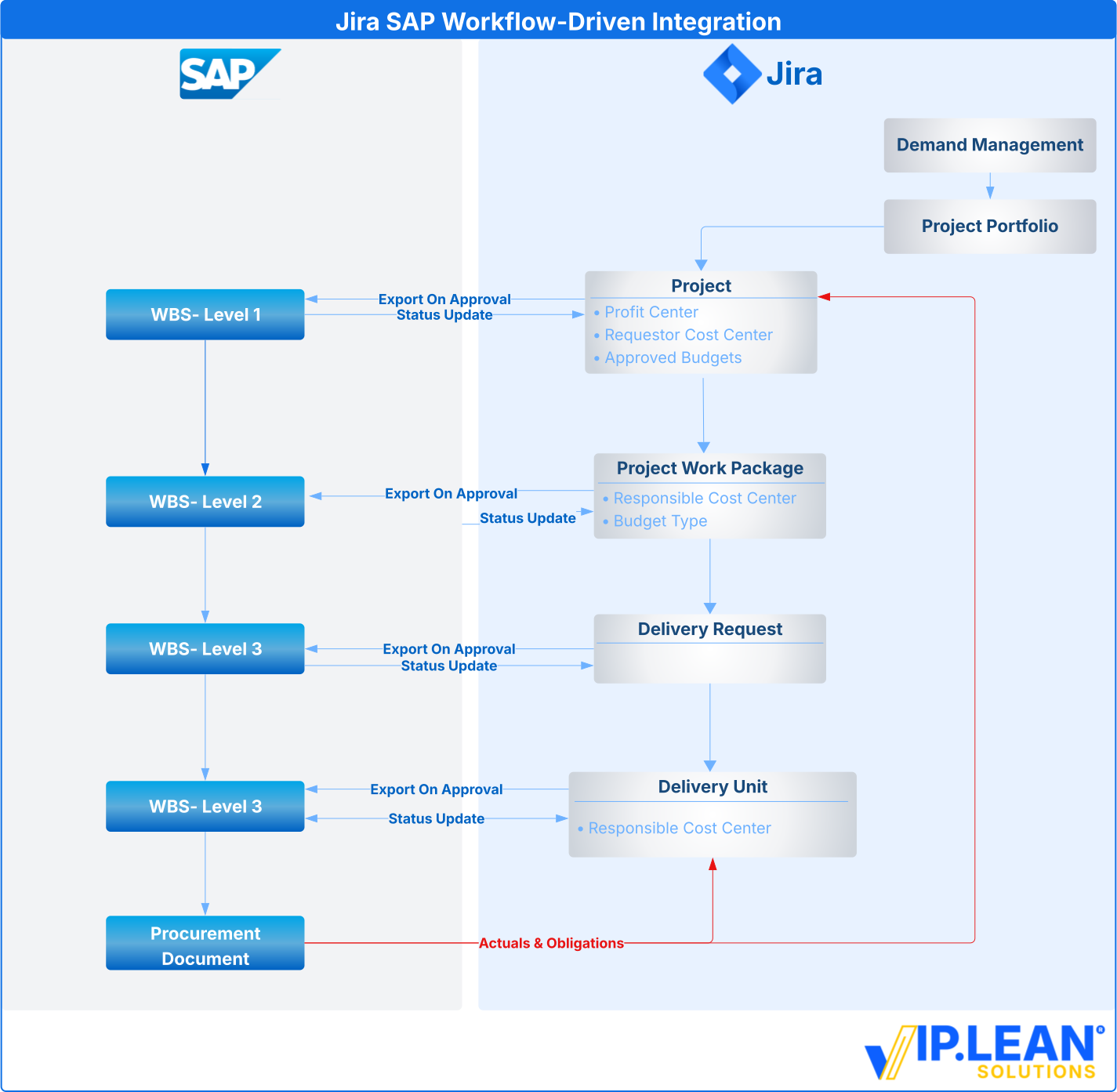
Avoid near-real-time “sync everything” designs that create conflicts and data drift. Instead, synchronise SAP only at clearly defined workflow gates that make information financially relevant (e.g., approval, commitment, closure).
The diagram below illustrates one possible workflow-driven synchronisation pattern derived from an enterprise implementation. Such an approach requires a clean structural linkage within Jira itself. The relationships between Project, Work Package, Delivery Request, and Delivery Unit must be consistently modelled and easy to navigate. In our engagement, this was supported by structured issue linking and guided creation patterns to ensure traceability across all levels of the hierarchy.
The technical ETL implementation is described in a later section.
The ETL layer acts as an orchestration component rather than a simple data transport mechanism.
Based on structured extracts from Jira and consolidated data in the integration database or data warehouse, the Python-based ETL processes determine when to trigger financially relevant updates in SAP. This includes, for example, creating WBS elements and controlled transfer of planned costs for financial tracking.
In the opposite direction, SAP provides structured financial reports — such as WBS overviews, Purchase Order reports, and Actuals and Commitments data. These datasets are synchronised back into Jira where relevant and, in parallel, fed into cost reporting pipelines.
Consolidated financial data is then made available to stakeholders through Power BI dashboards, ensuring transparency across governance, delivery, and controlling perspectives.
A robust integration requires a persistent binding between governance and financial objects. For each relevant element, a binding record is maintained linking:
Jira item ↔ SAP WBS element ↔ correlation ID ↔ lifecycle state
This ensures that synchronisation remains idempotent — meaning that reprocessing does not create duplicates — and that every SAP WBS element remains traceable to its originating governance object in Jira.
Such closed-loop binding is critical for auditability, operational stability, and long-term maintainability of the integration, especially in large-scale enterprise environments.
Rule-based linking mechanisms can further help maintain structural consistency as organisational models evolve over time.
To reduce downstream SAP rejections and financial inconsistencies, financial guardrails should be embedded directly into the governance workflow.
Examples include:
By introducing these controls before financial updates are triggered, governance decisions in Jira remain aligned with SAP controlling constraints. This reduces late-stage procurement surprises, avoids rejected postings, and stabilises financial reporting across systems.
In a large-scale enterprise environment with several thousand users, the Jira–SAP synchronisation model delivered measurable improvements in financial alignment. Planned values defined during the delivery process in Jira were consistently reflected in SAP, resulting in a close alignment of Actuals and Commitments at year-end. Typical fiscal year spill-over effects were significantly reduced. In addition, integrated SAP data feeds enabled near-real-time cost visibility through Power BI dashboards. Project leads gained reliable Actual vs. Plan transparency with minimal latency, strengthening financial control throughout the delivery lifecycle.
To support enterprise-scale Jira–SAP integration, VIP.LEAN Solutions provides the following components:
.svg)