1 min read
Try it in your own Jira.
All VIP.LEAN apps run on Forge and come with a free trial on the Atlassian Marketplace.
All VIP.LEAN apps run on Forge and come with a free trial on the Atlassian Marketplace.
A practical guide to extracting Jira data via Talend ETL into your own warehouse — with ERD, implementation steps, and a comparison to Atlassian Analytics.

(TU-Munich, 1997). 29 years of experience as a project, program and portfolio manager. Certified as a SAFE Agilist, Project Manager (GPM) and Scrum Master.

If you’re running Jira at scale — whether Data Center or Cloud — you’re sitting on a goldmine of project data. Issue histories, workflow transitions, time tracking, custom fields. It’s all there.
But getting that data out of Jira and into a place where you can actually work with it? Jira isn’t built for that. That’s where most teams get stuck.
We’ve been doing this for years at VIP.LEAN, including very large enterprise Jira setups with five-digit user counts. Talend is our ETL tool of choice, but the approach works with any ETL platform. This article walks through the full setup: why you need your own warehouse (we’ll use “warehouse” from here — whether you call it a data lake, lakehouse, or warehouse depends on your setup), how to model the data, and how to keep it fresh.
Data Center: You host the database yourself, so technically you have access. But Atlassian’s schema is complex and changes between versions — querying it directly for reporting is risky and generally not recommended. The better route: pull data through the REST API with an ETL tool, or use a purpose-built app like our VIP.LEAN ETL for Reporting.
Cloud: Here it gets tricky. On Free, Standard, and Premium plans, there’s no direct data access at all. Enterprise customers get Atlassian Analytics (the Atlassian Data Lake). In practice, it’s mainly designed for Atlassian’s own analytics experience — external BI connectivity and export options are limited compared to running your own warehouse.
For most teams, the takeaway is the same: if you want to run your own reports in Power BI, Tableau, or Looker, you need your own pipeline.
Reference: Schema for Jira family of products | Atlassian Support
You can’t easily get the data otherwise. On most Jira Cloud plans, there’s simply no analytics access beyond built-in dashboards. Even on Enterprise, the options are more limited than many expect.
Generic dashboards don’t cut it. When your PMO needs cross-project portfolio views or your CFO wants cost breakdowns by team, Jira’s built-in reporting runs out of road fast.
Connecting Jira to the rest of your business. This is the big one. Link issue data with SAP financials, HR systems, or CRM data. Compare planned effort in Jira against actual costs in SAP. That kind of cross-system insight doesn’t happen inside Jira.
You control security and compliance. Your data, your rules. PII masking, role-based access, GDPR-compliant storage — all under your control instead of depending on a third-party platform’s settings.
There are more reasons, but in our experience these four are what finally tips teams over into building the pipeline.
Here’s what the setup looks like with Talend:
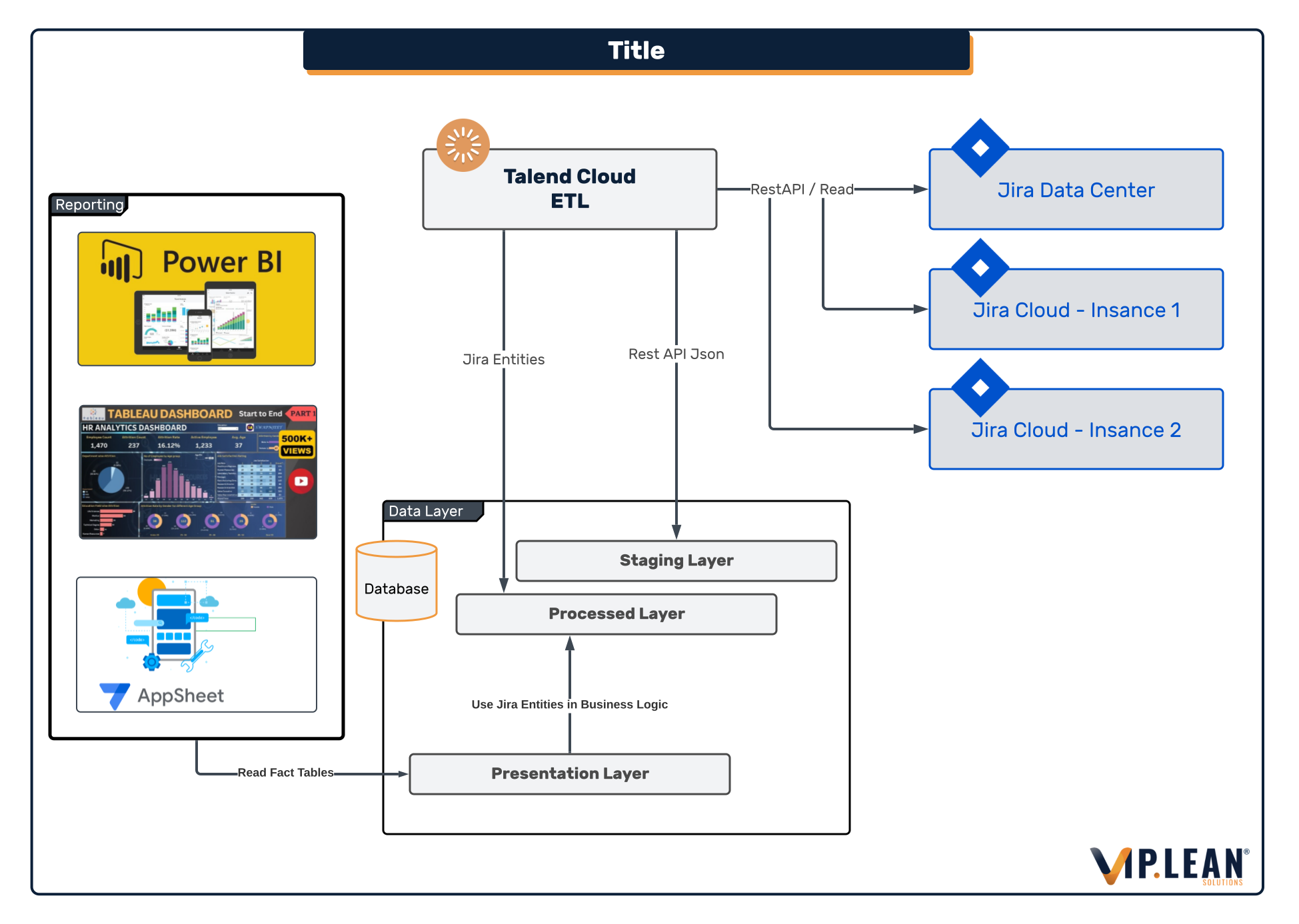
The building blocks:
The tools are the easy part. The data model and delta logic are where you’ll spend your time.
If you’re doing this for the first time, start with one project and one BI use case. It keeps the ERD decisions grounded. You can always expand once people trust the numbers.
Before you start extracting, you need a solid data model. We work with two layers:
Staging Layer — Raw JSON responses from the REST API, stored as-is. This is your safety net. When your data model evolves (and it will), you can reprocess from source without re-extracting from Jira. We can’t stress this enough: never skip the staging layer. The first time you need to backfill a new field across two years of data, you’ll be glad you kept the raw JSON.
Processed Layer — A structured ERD based on the REST API schema. One thing to watch out for: the Data Center REST API (v2.0) and Cloud REST API (v3.0) differ in several areas. If you’re running a hybrid setup, your model needs to handle both.
On top of the base model, we add several enrichment steps:

Talend connects to Jira’s REST API using Java routines. A few things we learned along the way:
Throttle your requests. Jira’s API has rate limits, and hammering it with parallel calls can degrade instance performance for your users. We started too aggressively on one project and got immediate pushback from the Jira admin team. Start conservative, then tune.
Use bulk inserts on the target side. The first time we ran this, we underestimated how expensive row-by-row loads get in BigQuery. Switched to batch writes — problem solved, costs dropped dramatically.
Parallelize smartly. Talend can run multiple extraction jobs at once — use this for independent entities (projects, users, issue types), but serialize changelog extraction to avoid API throttling.
Start with a full extraction of all Jira data. On large instances, this first full load can take several hours. Plan for it and run it off-peak — your Jira admins will thank you.
After that, switch to delta mode. We run issue updates every 5 minutes and administrative data (users, projects, workflows) every 60 minutes. The logic: issues change constantly throughout the day, while admin data is relatively stable.
All Talend jobs run in Talend Cloud. Make sure you assign an engine with enough resources — an undersized engine causes timeouts on large instances, and debugging those is no fun.
The changelog is one of the most valuable parts of Jira data — and one most people overlook. It records every field change on every issue: status transitions, assignee changes, priority updates, custom field edits.
We extract the full changelog and flatten it into a dedicated table. Combined with Jira’s native versioning, this gives you a complete historical view. Want to know how long a ticket sat in “In Review” before someone picked it up? The changelog tells you. Want to find out which teams consistently change priority after sprint start? Also in there.
Jira gives you natural keys like the Issue Key (PROJ-123) or Project Key (PROJ). Use these as business keys for human-readable references.
But for technical versioning, you’ll want surrogate keys. When an issue gets updated, the old version and the new version share the same Issue Key but have different surrogate keys. Keeps historization clean and queryable without ambiguity.
Two mechanisms that work well together:
Snapshots capture the full state of an entity at a point in time. Great for “what did the backlog look like last Tuesday?” queries.
Changelog-based versioning tracks individual field changes. More granular, less storage-heavy, and better for “how long was this ticket blocked?” analysis.
We use both: snapshots for portfolio-level reporting, changelog versioning for issue-level deep dives. Overkill? Maybe for small instances. But at scale, you’ll want both sooner than you think.
We chose BigQuery for a few practical reasons:
That said, the same architecture works on Azure SQL, Postgres, or AWS Redshift. Pick what fits your stack. We’ve seen teams run this on Postgres for smaller instances and it works fine — you just lose some of the auto-scaling convenience.
Once the raw data lands in your warehouse, you’ll want to transform it further:
Build data marts for specific use cases — one for the PMO, one for engineering metrics, one for finance. Resist the urge to build one giant “everything table.” It never works.
Generate dimension tables (users, projects, statuses, priorities) that serve as lookup tables across all marts.
Set up automatic user referencing so every user ID in any table resolves to the central user table. Sounds trivial until you realize Jira Cloud uses accountId while Data Center uses username.
Running more than one Jira instance? Common in large enterprises — maybe one Data Center for legacy projects and one Cloud instance for new teams. Or separate instances per business unit that were never consolidated.
Our pipeline handles both. The data lands in the same warehouse with an instance identifier, giving you a unified view across all Jira environments. Cross-instance reporting becomes straightforward: compare velocity between teams, or track a project that spans multiple instances.
Portfolio reporting that reflects reality — not the version someone manually updated in a slide deck last week.
Bottleneck analysis. Which workflow step causes the most delays? Which team consistently underestimates story points? The data is there — you just need to be able to query it.
Trend forecasting. With 6+ months of historical data, patterns emerge: seasonal spikes, creeping scope, teams that slow down before releases.
Resource planning based on actual throughput instead of gut feeling and spreadsheet estimates.
Cross-system insights. When Jira data meets SAP financials in one warehouse, finance teams finally get the cost transparency they’ve been asking for. Planned vs. actual, by project, by quarter. That’s hard to argue against.
Keep the raw JSON. Always. In a staging layer. When your data model evolves — and it will — you can reprocess from source without re-extracting. This has saved us more times than we’d like to admit.
Think about security before the first team gets access. PII masking, row-level security, audit logs — bake these in early. Retrofitting security onto a running warehouse with live users is painful and politically messy.
Design for growth. Your first use case might be a simple sprint burndown. But once teams see what’s possible with their data in a proper warehouse, requests multiply fast. Partition your tables, use incremental loads, and keep your schema extensible.
.svg)