Pick a work item. The link follows.

Issue Pickers turns a custom field into a JQL-filtered list of work items: one or many, unlimited options, with native Jira links created on pick and kept in sync when someone links or unlinks in Jira.

Jira Cloud, Jira Service Management and the JSM portal · Runs on Atlassian · 30-day evaluation

One minute, with voice-over.

NewDynamic JQL

A filter that follows the work item being edited.

A context tailors a picker to its spaces and work types. With Dynamic JQL, its filter also reads values of the work item being edited, written as currentItem.<field>. One picker, and every work item gets the list that fits it.

Current work item Context filter
Customer = currentItem.Customer AND statusCategory != Done
Search sent to Jira
Customer = "Acme Rail" AND statusCategory != Done

Same picker, same filter. The list follows the customer of the request.

Only fields that work are suggested.

The editor offers just the currentItem fields that can really be used, and coloured markers show on which screens each value can be read.
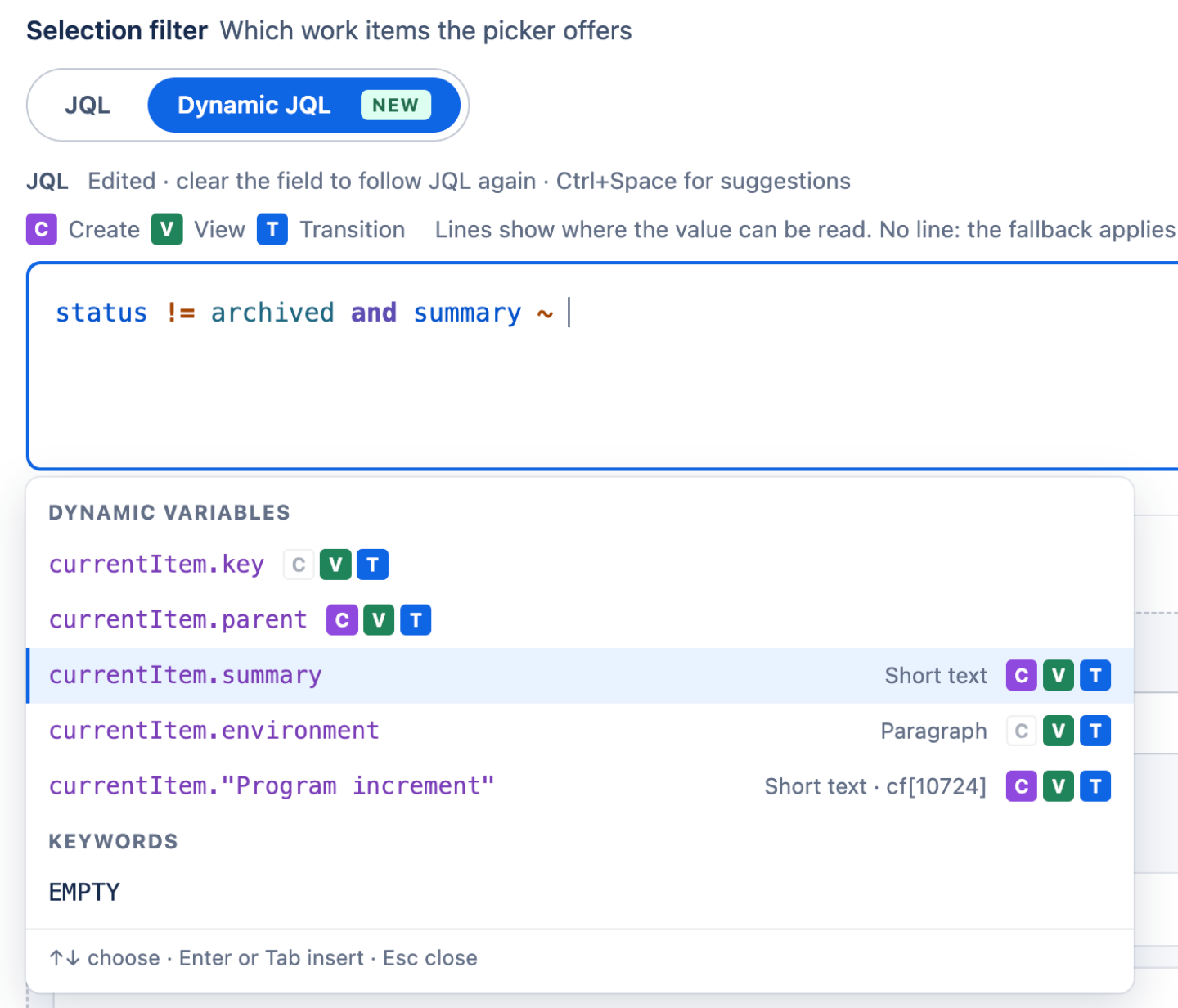
CCreateVViewTTransitionPPortal create
Dynamic JQL editor suggesting currentItem fields, each marked with the screens where it can be read

Test it with real work items.

Pick a sample work item and a screen. The preview builds the exact JQL for that work item and runs the real search in Jira, before anyone uses the picker.
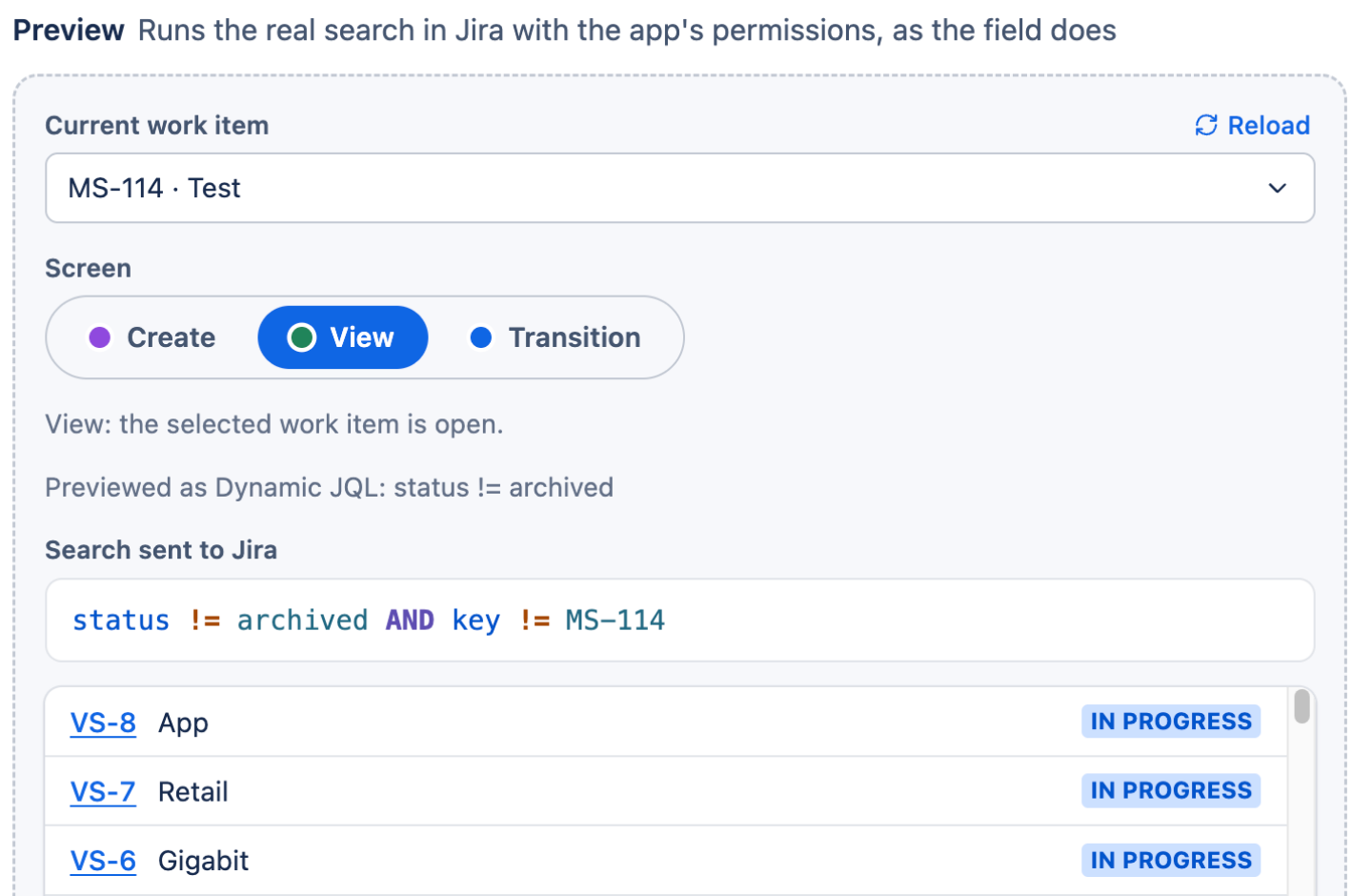
Preview with a chosen work item and screen, the search sent to Jira and the work items it finds

A defined fallback for empty values.

When a value is empty or can't be read on a screen, you decide what the condition does.

.falseIfEmptyDEFAULTThe condition matches nothing.
.trueIfEmptyThe condition is left out, the rest of the filter still applies.


Five things a field does once it knows Jira.

Each one is a setting, not a script. Scroll to watch the same picker do all five.

Create · Purchase requestJQL filter
CON-118Master Service Agreement · AdobeACTIVE
CON-302Master Framework Agreement · CloudACTIVE
CON-091Support Contract · Legacy ERPEXPIRED
CON-077Master Licence Terms · AtlassianACTIVE
Showing 4 of 1,240Load more
CreateEditTransitionJSM portal

Show only the right work items

A JQL filter decides what appears: active contracts, this category, this project. Expired ones never make the list, so nobody picks them by accident.

Unlimited options, no waiting

No cap on how many work items a picker can offer. It loads a first page and fetches more on demand, like Fix versions does; type a word or a key and the list narrows through Jira's own search.

One or many, your call

Single-select for a parent, a contract, an owner. Multi-select for dependencies, affected components, related requests.

Linked the moment it is saved

Choose a link type and every pick becomes a native Jira link, on create, edit and transition screens and in the JSM portal. Reports, boards and automation see it like any other link.

Both directions, always

Someone adds or removes the link on the work item instead of in the field? The picker follows: remove on unlink, add on link, each its own switch. Field and links never disagree.

Click through it yourself.

Create an Issue Picker in under three minutes, in the real app. Play it with voice-over or click through at your own pace. No install needed.

29 steps · 6 chapters · English voice-over Open full screen

Built for the Jira you actually have.

Large instances, existing links, automation rules and admins who would rather configure than script.

Unlimited options.

No limit on how many work items sit behind a picker. Search and paging only fetch what is on screen, so the field stays quick however large the instance grows.

Unlimitedoptions in one picker

Fill pickers from links you already have.

Introducing pickers into a live instance? Auto-fill scans up to 3,000 work items, shows you the candidates and fills up to 1,000 per batch, empty fields only.

One field, a different list per project.

Give each project and work type its own JQL, or restrict the picker to the current project, so a single field serves every space. The JQL editor validates as you type.

Automation sets it, reads it, extends it.

Set picker values from Jira Automation, add to them without overwriting, copy them between fields, and use the picked work item's own fields in your rules.

Keys and status, shown or hidden.

For people who think in names, not keys, hide the key in the picker, the view, or both, and hide the status too. Search and linking keep working underneath.

How it compares.

The other picker app on the Marketplace, and Jira's own links, side by side with what admins ask us about most.

VIP.LEAN Issue PickersIssue Picker for JiracodecentricNative issue links
Options in one pickerUnlimitedNo cap on optionsUp to 2,000Documented limit, for performanceEverythingNo filtering
Filter what people can pickJQL, per contextPlus restriction to the current projectJQL, per contextDynamic placeholders on create and transition screensNo
Filter by the work item being editedDynamic JQLOn create, view and transition screens; space and request type on the portalPlaceholdersOn create and transition screensNo
Link created on pickYesCreate, edit, transition and JSM portalYesWhen the field is savedManual
Links changed in Jira, field followsYesAdd on link and remove on unlink, each its own switchNot availableField to link only–
Fill fields from existing linksBulk auto-fill in the appCandidates listed first, 1,000 per batchCSV export and importBetween instances, by hand–
Jira AutomationSet, extend, copyUse the picked work item's fields in rulesVia smart valuesYes
Runs the search asThe app or the current userOne switch per fieldThe app or the current userAdmin's choice per fieldThe current user
Best whenLarge instances, existing links to adopt, field and links that must never driftPlaceholders in JQL matter more than list size or two-way syncA handful of links, added by hand

Compiled from the vendors' public documentation as of September 2026. Products change; if we got something wrong about yours, tell us and we'll fix it. Issue Picker for Jira is a product of codecentric AG.

Coming from Data Center? Your links make the move. So can your pickers.

ScriptRunner's Issue Picker field has no counterpart in Jira Cloud, so its values stay behind. The Jira links it created travel with the Cloud Migration Assistant, and that is all Issue Pickers needs.

  1. Migrate as usualRun the Cloud Migration Assistant. Work items and their links arrive in Cloud; the ScriptRunner picker fields do not.
  2. Create the pickerAdd one Issue Picker per Data Center picker, with the same Link Type and a JQL that matches what the old field offered.
  3. Auto-Fill from linksAuto-Fill scans the migrated work items, lists the candidates and fills each empty field from its links. From then on, field and links stay in sync.

We map your Data Center pickers with you before the cut-over. Plan the picker migration

PR-2041 Purchase requestScriptRunner Issue Picker
CON-118Master Service Agreement
Field type not available in Cloud
Filled by Auto-Fill

Connect your first field this week.

Install from the Marketplace, then book a free working session: we'll set up your first picker, the JQL and the link type with you. Solution Partners get stackable discounts of up to 30%.

Questions first? Read the docs or open a support ticket.