1 min read
Try it in your own Jira.
All VIP.LEAN apps run on Forge and come with a free trial on the Atlassian Marketplace.
All VIP.LEAN apps run on Forge and come with a free trial on the Atlassian Marketplace.
The Earned Schedule Analysis provides more reliable time-based indicators for project schedule monitoring than traditional SPI and SV metrics from earned value analysis.

(TU-Munich, 1997). 29 years of experience as a project, program and portfolio manager. Certified as a SAFE Agilist, Project Manager (GPM) and Scrum Master.

Many project managers make estimates about the deadlines and the end of the project with a high degree of uncertainty, even though they have used earned value analysis. This is because the SPI and SV indicators are not reliable metrics. In this case offers The Earned Schedule Analysis a helpful approach to schedule monitoring.
Earned schedule analysis is a new concept developed by Walt Lipke in 2003. The Earned Schedule (ES) is now an appendix in the PMI Practice Standard for Earned Value Management and is considered an extension of EVM practice. Although the knowledge and use of ES has grown immensely over the last decade and has spread worldwide, the method remains unknown to many EVM users.
The concept of the earned schedule is analogous to the earned value. However, instead of using cost to measure on-time delivery, time is used. Rather than just looking at on-time delivery based on the value of work done vs. schedule, the earned schedule looks at when the work should have been completed. The Earned Schedule method allows us to calculate time-based indicators.
To measure the earned schedule, we need to know when the work should be done. In other words, at what point in time would the current Earned Value (EV) have been achieved? This can be in the past or future depending on the EV to PV ratio.
This is determined by drawing a horizontal line from the current cumulative EV to the PV curve. The intersection of this line with the PV curve is then projected onto the time axis. The distance from this point in time to the start of the PV curve then corresponds to the earned schedule.
The earned schedule shows the planned duration of the work done so far (earned value) at the current time AT (actual time). In our solutions, we use “days” as the unit for the ES. In the graphic below, the ES ≈ 95 days.
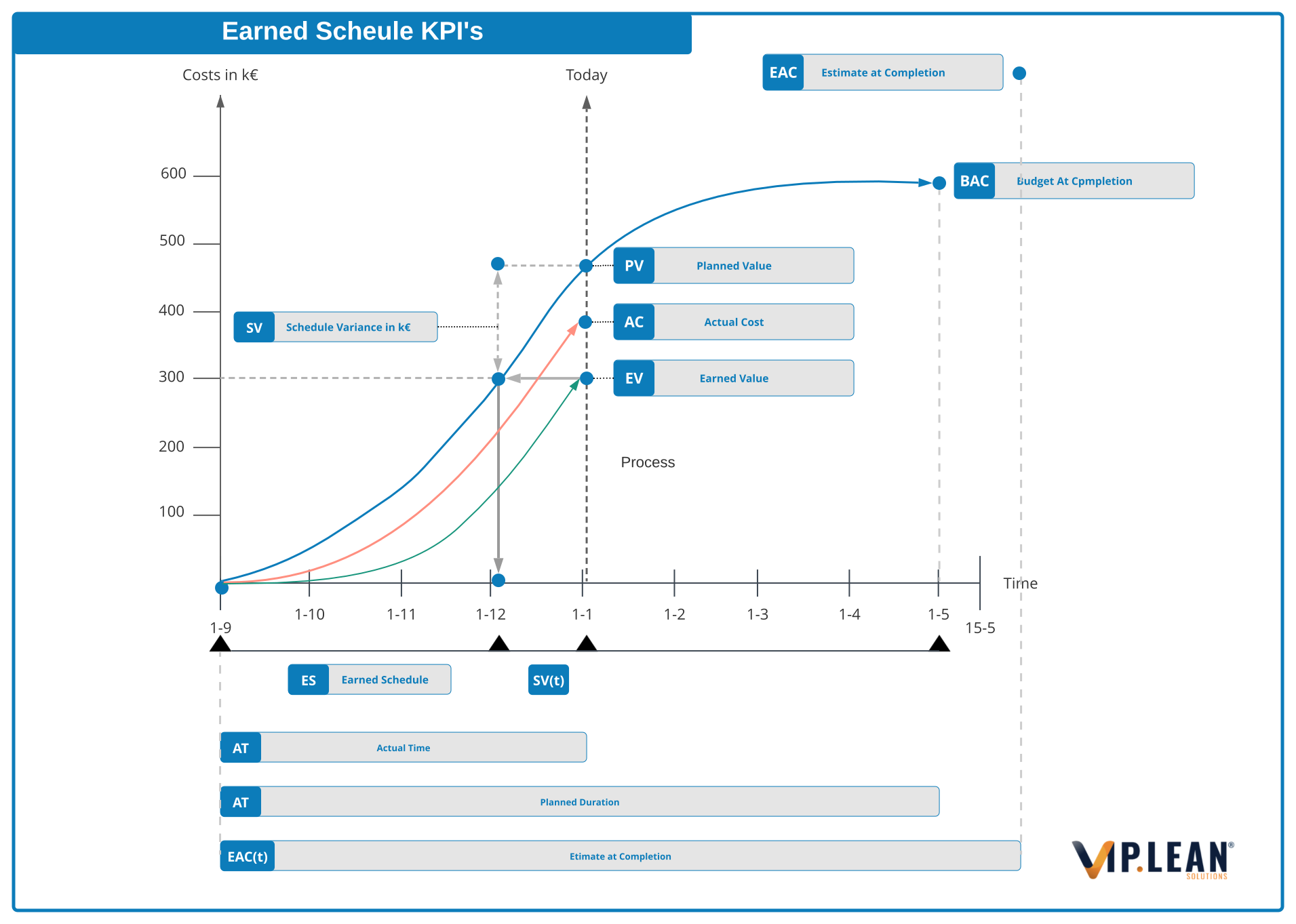
The other new parameter is the current duration (AT), which is the number of days that have elapsed since the project started.
The planned duration (PD) is the original duration of the project. Now we have 3 key elements to assess schedule status in units of time:
Similar to the traditional EVA metrics, new KPIs can be generated:
The important observation is that SPI(t) and SV(t) have remained good indicators of project status even after project completion, while SPI(€) and SV(€) end up at 1.0 regardless of late project completion.
The ES approach therefore has a memory effect, which is very helpful in project reporting and subsequent retrospectives.
In addition to the schedule performance metric, schedule forecast metrics can also be used to predict the schedule completion date (EAC(t)) and Variance at Completion (VAC(t)).
.svg)