







What are Behaviours, Conditions and Actions?
Understand the core concepts of VIP.LEAN Behaviours Builder. Learn what Behaviours, Conditions, and Actions are, and how they work together to automate Jira field modifications.
1. What Is a Behaviour?
A Behaviour is a container that holds a set of Conditions and Actions operating within a shared context. Behaviours allow you to group logic and define a specific context for this group.
2. Behaviour Structure
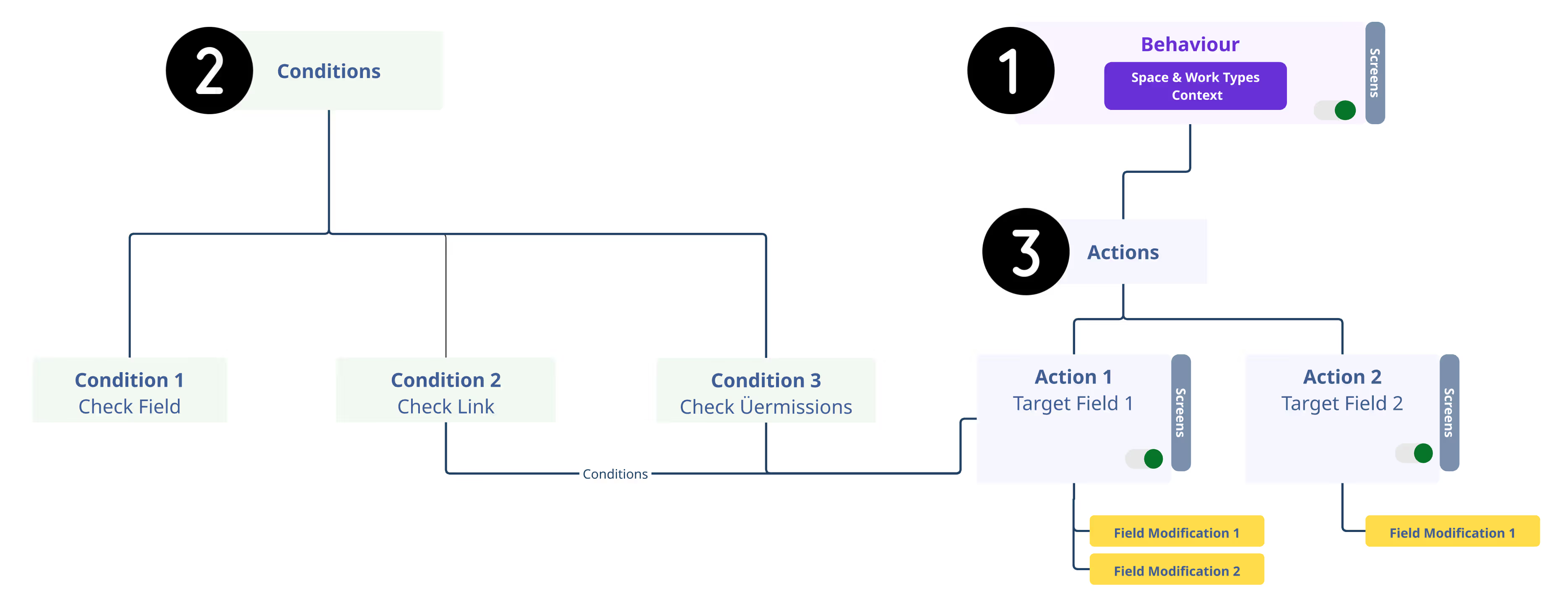
Each Behaviour includes:
- Name: A label to identify the Behaviour.
- Context Definition: A combination of Spaces and Work Types where this Behaviour is active.
- Behaviours can have either draft, active, or paused status.
Contained Artefacts:
- Actions: Specify how the target field within the behaviour context should be modified.
The creation of a behaviour is always the first step in a logical workflow.
3. What Is a Condition?
In addition to Behaviours, the Jira Admin can begin setting up the necessary conditions for Actions that will modify fields based on specific criteria. The Jira Admin also has the option to add conditions directly from the Action setup.
Conditions are not mandatory to create actions later. They are stored centrally and can be reused by any actions within behaviours.
A Condition includes:
- Name: A label to identify the Condition.
- Type of Condition: The app will offer continuously new condition types.
- Condition Expression: The Jira admins enter the condition expression they need using pre-defined operators and entry fields, without any code or scripting.
The app identifies for which screens the condition is usable: Create, Transition, View. This is based on the technical background of the conditions. For example, check links can be done only after a work item has been already created (View / Transition).
4. What Is an Action?
The Action outlines the specific modification the Jira admin intends to implement on a chosen target field.
An Action includes:
• Name: A label to identify the Action.
• Target Field: Each Action specifically targets a selected Field. Multiple Actions can operate on different or the same fields. In case of conflicts, Atlassian provides a built-in warning, enabling the Admin to make adjustments.
• Screens: Each Action can function across a combination of the following screens: Create, View, and Transition.
• Event Type: An Action can trigger after a screen loads and/or with every screen change.
• Conditions: The Jira admin can establish either conditioned or non-conditioned Actions. Predefined Conditions can be combined using logical operators.
• Modification: This refers to the UI Modification that the Jira admin configures using specific fields tailored for each Field type.
The creation of behaviour actions is the last step in a logical workflow.
Integrate your CRM with other tools
Venenatis sollicitudin posuere elit consequat et enim. Neque tortor amet dictum tempor. Leo facilisis aliquet viverra scelerisque eleifend viverra est. At massa erat vel amet enim laoreet dictum pellentesque. Urna cursus quam pulvinar tellus. Duis fermentum nibh volutpat morbi. Et ac sed ultricies ut nunc.
How to connect your integrations to your CRM platform?
Et urna ac et maecenas fusce amet. Nibh nec commodo massa sed. Tincidunt porttitor in pharetra egestas sit neque ac lacus. Amet a nunc et cum. Odio at volutpat volutpat in leo eget ipsum diam elementum. Erat magna arcu orci.
- Morbi fringilla molestie magna sed dictum. Praesent pharetra.
- Cras mi purus, viverra vitae felis sit amet, tincidunt fringilla lorem.
- Non mattis urna ex nec sem. Donec varius diam et suscipit.
- Quisque euismod posuere lacus sit amet volutpat praesent.
Quis faucibus massa sit egestas. Sit fermentum est ac pulvinar et sagittis sed sit ut. Quis faucibus aenean nibh vestibulum enim mi sit. Sollicitudin ultrices ultrices in ipsum urna fringilla massa leo. Sapien ultricies vitae rhoncus molestie purus. Urna urna dolor euismod porttitor et. Magna adipiscing dictum et adipiscing.

Quis faucibus massa sit egestas. Sit fermentum est ac pulvinar et sagittis sed sit ut. Quis faucibus aenean nibh vestibulum enim mi sit. Sollicitudin ultrices ultrices in ipsum urna fringilla massa leo. Sapien ultricies vitae rhoncus molestie purus.
Infotech is the next-gen CRM platform designed for modern sales teams
Cursus curabitur euismod vel fermentum sapien non dolor odio vel. Tortor lectus mauris in praesent a tincidunt nam. In aenean odio aliquet pretium viverra elit quis magna. Eget ut risus posuere velit purus nisi nec sollicitudin tellus enim.
“Sed id mi eget urna facilisis pharetra. Nunc viverra est at magna maximus consectetur. Sed nec maximus augue. Aliquam commodo sem eu.”
Cursus curabitur euismod vel fermentum sapien non dolor odio vel. Tortor lectus mauris in praesent a tincidunt nam. In aenean odio aliquet pretium viverra elit quis magna. Eget ut risus posuere velit purus nisi nec sollicitudin. Tellus enim interdum neque sit vestibulum lacus. Nam pulvinar a lectus justo aliquet.
Why using the right CRM can make your team close more sales?
Sed non quis tellus velit orci. Quam sed mauris elementum tempor viverra. Luctus semper risus ipsum id diam praesent. Pretium eget mauris ultrices curabitur sed sem amet. Erat nulla habitant in mattis massa mi adipiscing.
- Morbi fringilla molestie magna sed dictum. Praesent pharetra.
- Cras mi purus, viverra vitae felis sit amet, tincidunt fringilla lorem.
- Non mattis urna ex nec sem. Donec varius diam et suscipit.
- Quisque euismod posuere lacus sit amet volutpat praesent.
What other features would you like to see in our product?
Sed non quis tellus velit orci. Quam sed mauris elementum tempor viverra. Luctus semper risus ipsum id diam praesent. Pretium eget mauris ultrices curabitur sed sem amet. Erat nulla habitant in mattis massa mi adipiscing ullamcorper condimentum. Erat quisque integer tincidunt ac amet.