





1 min read
Try it in your own Jira.
All VIP.LEAN apps run on Forge and come with a free trial on the Atlassian Marketplace.
All VIP.LEAN apps run on Forge and come with a free trial on the Atlassian Marketplace.
Launch the next process from its context, adapt the form to that context, and link it to existing business objects — all inside standard Jira Cloud.

2013: Doctor of Computer Science. 2021: Master of Business Administration (MBA). 13 years of experience in project management.
Jira already provides a strong foundation for workflows, permissions, approvals, automation and traceability.
With the right extensions around those capabilities, it can also support richer, connected business processes that feel natural to the people using them.
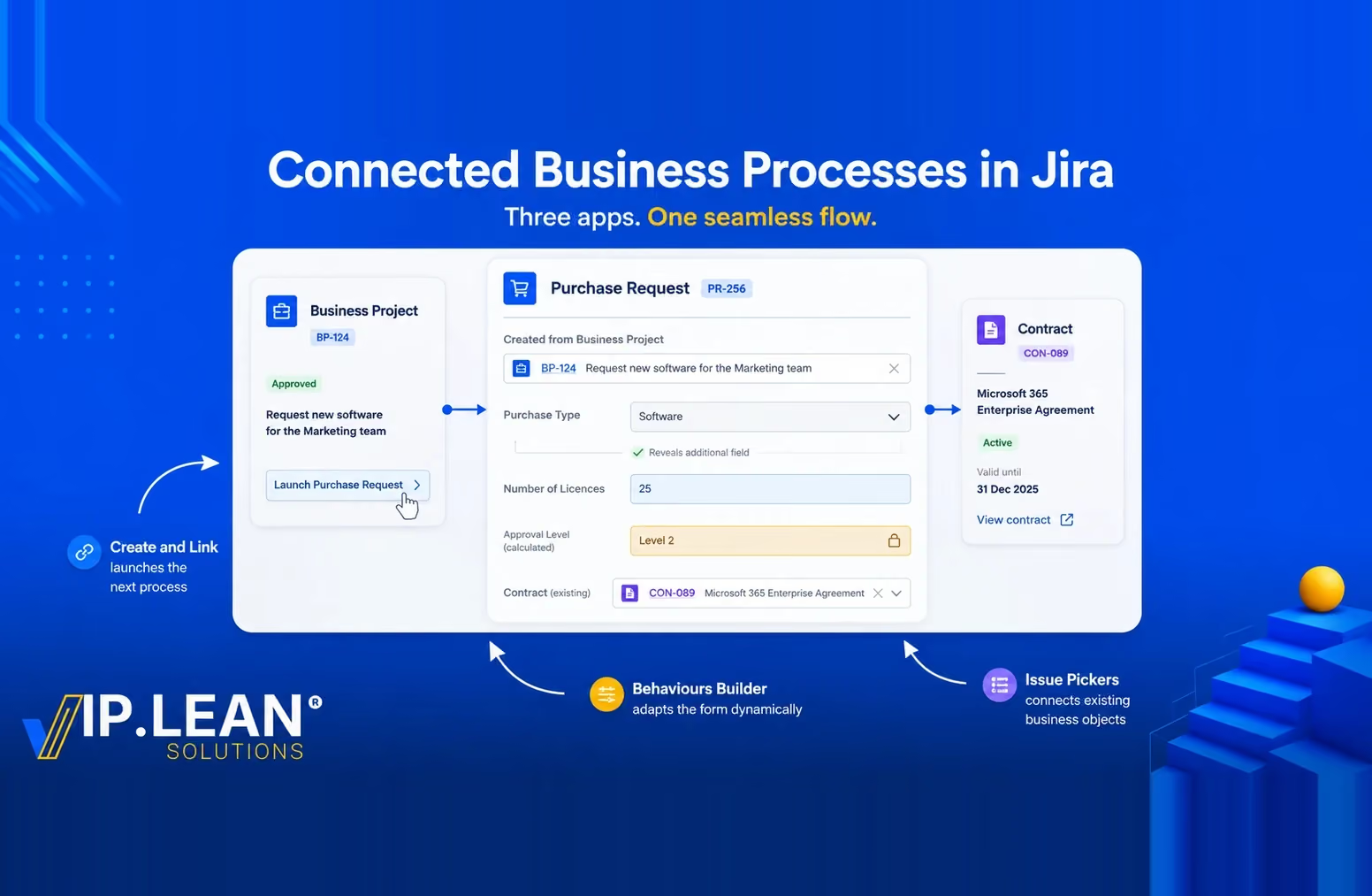
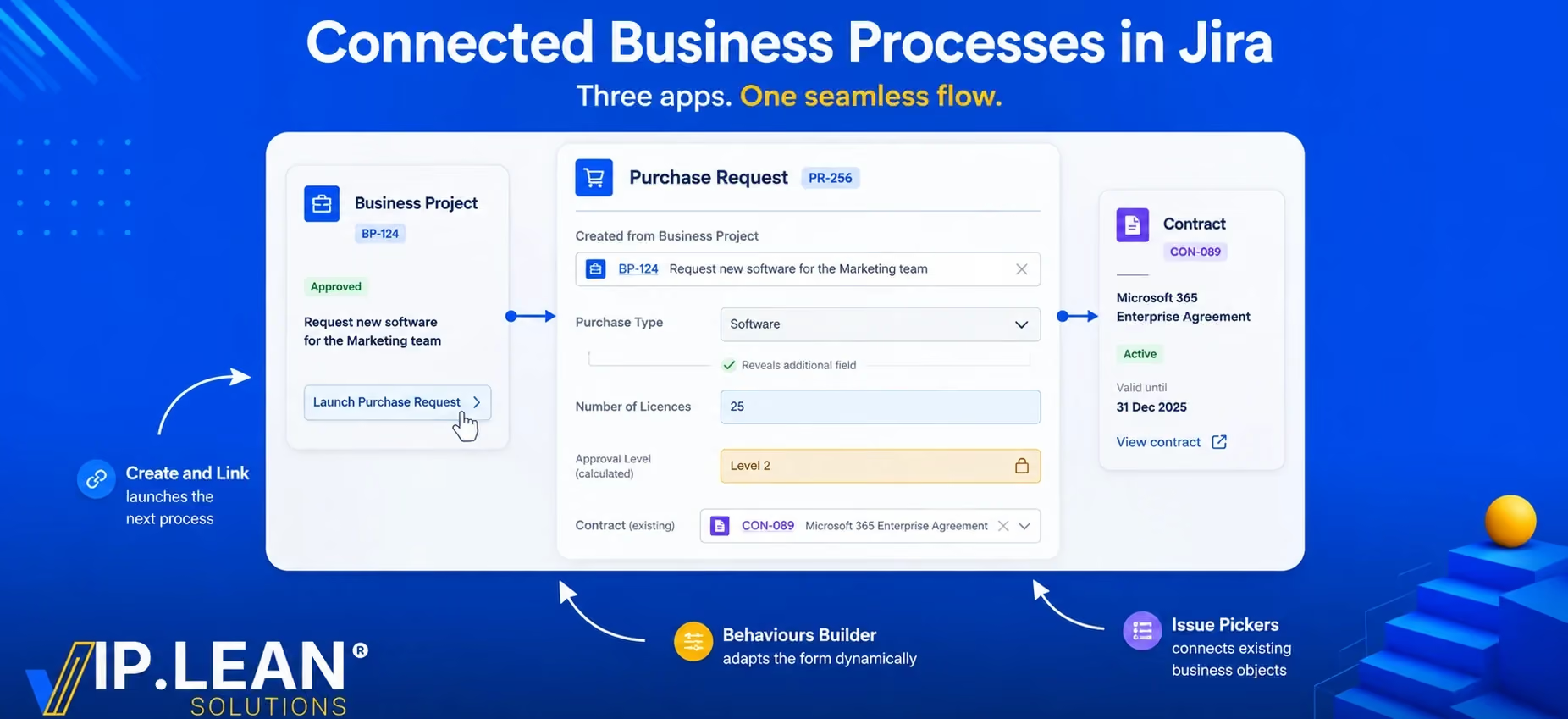
To illustrate what is possible, let’s take a very simple example: a Purchase Request initiated from an existing Business Project.
We will use three complementary VIP.LEAN apps:
The objective is not to design a complete procurement process. The Purchase Request is simply a practical example to show how these capabilities can work together.
Imagine that a company manages its internal Business Projects in Jira. A Business Project may have its own lifecycle, budget, department, cost center and owner. We do not need to explore that process here. At some point, the project requires a purchase. The resulting business flow can be as simple as follows:

Each object can have its own workflow, permissions and business rules, while remaining connected to the wider business context.
This is where the three apps complement each other.
The user is already working inside the Business Project when the need for a purchase arises.
Instead of opening a generic Jira create screen and manually rebuilding the context, the Business Project can expose a clear business action:
Create Purchase Request
With Create and Link, a button can be configured to create the Purchase Request and automatically establish its relationship with the Business Project.
Relevant information from the source can also be carried into the new request, for example: Department · Cost Center · Project Owner.
Create and Link goes beyond simply adding another way to create a work item. The action itself can be contextual. Its availability can depend on the Jira context, JQL conditions, work type, users, groups or roles.
The creation experience can then be shaped around the business action: target context, predefined values, inherited information, hidden fields and automatic linking.
When everything required is already known, the same concept can even become a one-click business action.
Once the Purchase Request is opened, not every purchase necessarily needs the same information.
A software purchase, for example, may require information that makes no sense for office equipment.
With Behaviours Builder, the Jira form can react dynamically to what the user enters.
A simple example could be:
Purchase Type = Software
and the form immediately:
The important possibility is that the interface itself can follow the business context, instead of presenting every possible field and option to every user.
Behaviours Builder can dynamically control aspects such as:
visibility · required/optional · editable/read-only · labels · descriptions · field values · available options · validation
Dynamic field behaviour exists in different forms across the Jira ecosystem. What becomes especially interesting here is how the rules can be structured and reused.
Conditions and behaviour logic can be centrally defined and applied across different contexts instead of treating every screen as an isolated configuration.
Another useful aspect is configuration awareness: the builder takes Jira's supported UI modification capabilities into account and helps administrators understand whether a specific modification is valid for the selected context.
For an organisation implementing many business processes, this can make behavioural rules easier to govern and reuse as the Jira environment grows.
Later in the process, Procurement may need to associate the Purchase Request with an existing Contract.
A Contract is not simply a value in a dropdown. It can itself be a Jira work item with its own owner, dates, status, lifecycle and related information.
This is a natural use case for Issue Pickers.
Instead of searching through Jira manually, the user can select the relevant Contract directly from a dedicated field. The available work items can be restricted using JQL, so the user sees only the contracts that make sense in the current context.
For example:
Active contracts relevant to this type of purchase rather than every contract or every work item in Jira.
Selecting the Contract then maintains the corresponding Jira relationship.
The result is simple for the user:
Purchase Request → Select Contract → Relationship created
One of the more distinctive aspects of Issue Pickers is the relationship between the picker field and native Jira issue links.
The picker can maintain the underlying Jira link, while changes made directly to those links can also be reflected back in the picker.
This means the picker does not have to become a separate relationship model disconnected from Jira. It can sit on top of Jira's native linking mechanism while providing a much more convenient business-oriented selection experience.
Existing Jira links can also be used to populate picker relationships, which is particularly useful when introducing Issue Pickers into an environment that already contains established data and relationships.
Individually, each app solves a different problem.
Together, they create a broader pattern:
Create and Link
→ Launch the next process from the right business context.
Behaviours Builder
→ Adapt the experience and business rules to that context.
Issue Pickers
→ Connect the process to existing business objects.
Our simple Purchase Request therefore becomes:
Business Project
→ creates and provides context to
Purchase Request
→ dynamically adapts to the request
→ connects to an existing
Contract
And the same pattern can extend much further.
A Business Project might eventually connect to Purchase Requests, Contracts, Recruitment Requests, Change Requests or other company processes — each with its own lifecycle, while remaining part of a connected business model in Jira.
The Purchase Request is only one example.
The broader possibility is to use Jira not only to move individual work items through workflows, but to create connected business processes where actions, forms and relationships reflect the way the organisation actually works.
Launch the next process. Adapt it to its context. Connect it to the rest of the business.
Links:
.svg)